Enabling Zephyr Agent for Rovo
Zephyr Agent for Rovo is available to customers with access to both Rovo and Zephyr.
Prerequisites
Note
If you still do not see Zephyr Agent for Rovo make sure you are updated to the latest version of Zephyr. If you are on the latest version but still cannot access Zephyr Agent for Rovo, submit a support ticket.
Verify that Zephyr Agent for Rovo is enabled for your Jira instance.
Confirm that Zephyr is installed and enabled in your Jira instance.
Make sure you have access to Zephyr in the jira space where you want to use Zephyr Agent for Rovo. If you cannot view Zephyr pages in that space, ask a Jira space admin to update your permissions.
To enable the agent, follow these steps:
Open Rovo
Open and click the Rovo agent from the list.
In the Searchbox, enter Zephyr
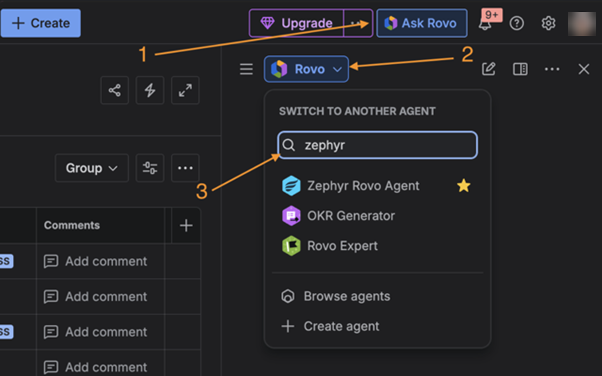
Once the agent is selected, you can use it immediately with the supported capabilities.
Note
Click the star icon to bookmark Zephyr. This action allows you to access it quickly without searching each time.
Usage and Expectations
The Zephyr Agent for Rovo is designed to answer specific test management–related questions using its supported capabilities.
When using the agent:
Use clear prompts that align with the supported capabilities.
Enter all the required inputs, such as a space key, when requested by a skill.
Expect responses to focus on summaries and insights rather than raw data or configuration changes.
The agent does not perform actions such as creating, editing, or deleting Zephyr entities. Free form analysis is supported to the extent that Zephyr Agent for Rovo can fetch data from Zephyr, and Rovo can then use that data for your custom analysis. Results can be unpredictable because the analysis relies entirely on Rovo.
Note
Zephyr Agent for Rovo does not support additional queries, custom reports, or actions outside the defined capabilities.
The agent relies on existing Zephyr data and Jira permission settings.
If you do not have access to a space or its test data, the agent does not return results for that selected space.
Responses are provided in a human-readable format to support decision-making.
The agent is not intended to replace detailed reports or manual investigation.